
SiNAPS Data Pipeline
As a leading innovator in neural data acquisition technologies, Plexon has long been committed to providing its users with the tools needed to process data in a seamless, integrated workflow. In this spirit, Plexon has developed the SiNAPS Data Pipeline (SDP), a collection of Plexon- and 3rd-party software tools that enable users to overcome the challenges inherent in sorting and analyzing large data sets recorded from high-density, CMOS-based probes. The result is standard numpy and NeuroExplorer data files for subsequent analysis.
High-density neural probes like SiNAPS require a different method of data acquisition and spike sorting workflow. As increases in inter-pixel density
 pack pixels more tightly together, signals from a given neuron can register across multiple adjacent pixels. Traditional spike sorters are ill-equipped to handle the resulting data redundancy as they were built with the assumption that adjacent pixels share no common units. This redundancy is compounded by the accompanying increased number and density of pixels on a single probe, up to 1024 pixels on a single shank in two or more columns.
As a leading innovator in neural data acquisition technologies, Plexon has long been committed to providing its users with the tools needed to process data in a seamless, integrated workflow. In this spirit, Plexon has developed the SiNAPS Data Pipeline (SDP), a collection of Plexon- and 3rd-party software tools that enable users to overcome the challenges inherent in sorting and analyzing neural data recorded into Plexon PL2 files with OmniPlex and SiNAPS probes.
OmniPlex provides two paths for recording neural data and thus two pathways for the SiNAPS Data Pipeline to follow. The first path, online, is conventional spike processing that takes advantage of a cutting-edge culling heuristic that eliminates redundancy in the waveforms shared across adjacent pixels and the data is recorded as SPK data type in PL2 files. OmniPlex conventional channel-based visualizations and sorting are supported. The second path is raw, wide band (WB), high-density pixel data from SiNAPS recorded directly to PL2 files for subsequent offline processing. OmniPlex supports recording both SPK and WB acquisition paths simultaneously. Experiment related digital, FP, and analog data are also recorded into the PL2 file either way.
The online pathway is used primarily for visualization during an experiment. Sorting and analysis can proceed based on the conventional OPX/OFS/NeuroExplorer workflow if desired but is not recommended as this approach does not perform corrections for probe drift, overlaps, or jitter, and does not provide the exceptional high-quality sorting for which SiNAPS probes are intended. The results are draft quality and in general recommended only for getting started with HD sorting and experimenting with OPX.
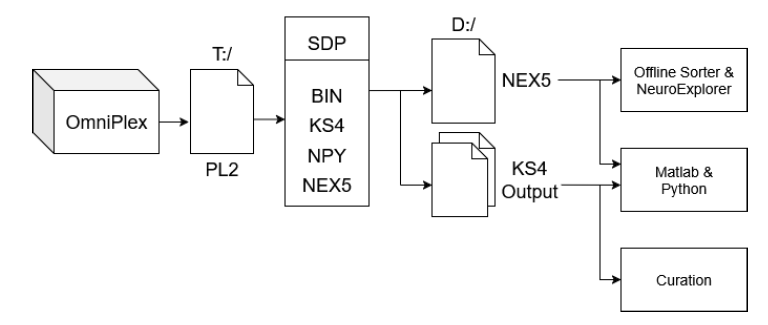
The offline pathway is the standard method for processing a file of recorded WB raw data. WB data in a PL2 file is extracted and converted to a .bin BINary file in raw-interleaved format. Kilosort is perhaps the most widely used high-density array sorter. Kilosort4 performs operations on the .bin file including high pass filtering, waveform extraction, spike sorting, drift and overlap correction, and stores the spike sorted results in a collection of Python NumPy files with the extension .npy. A NeuroExplorer .nex5 file is also created containing a simple curation of spike clusters into timestamps, digital events, FP waveforms, and experiment analog data. Spike waveforms are optional but not recommended. See Why Neuroexplorer.
Ref: Marius Pachitariu , Shashwat Sridhar, Jacob Pennington & Carsen Stringer (2024) Spike sorting with Kilosort4
SDP Environment
Recordings from SiNAPS HD probes can be quite long, from a few GB up to a few hundred GB, and require substantial processing power for offline array processing and spike sorting. Plexon provides Dell workstations configured with fast storage and a high-performance Nvidia graphics processing unit (GPU) for SiNAPS signal processing and array sorting, but the processing time can still be quite long, depending.
Why NeuroExplorer?
NeuroExplorer (Nex) is a data viewing and analysis package widely used by the non-HD community, typically Intan based recording systems. It is very comprehensive with many features of data conditioning and analysis functions. Nex can also be used for viewing and analyzing the output from KS4. Nex does not process, sort, or curate HD cluster oriented data, but as a convenience to the user, the SDP package can process clusters in the NumPy files after KS4 sorting and select the highest amplitude spike in each cluster, assign that spike to the nearest pixel and create a nex5 file with all the recorded data types. Not curation as such but it makes the KS4 sorted output immediately available for viewing and any of the Nex analysis functions can be applied for overview or preliminary analysis.
Nex includes spike snippets, field potentials, digital events, analog experiment data, and limited continuous wide-band data type. Data is stored in .nex5 (5th gen) files and in memory in a vectorized format instead of a blocks-of-data as recorded format. All data types adhere to a rigid time-stamp protocol. Nex requires that an entire file be loaded into ram, which can put a limit on file size depending on the ram size of the computer and the length of the file. Continuous wide-band takes the most space but is rarely used by Nex for analysis.
Nex is not freeware as it is based on many years of continuing development and doesn’t suffer the frailties of academic software. Nex is installed on all OmniPlex systems, and a license is included if purchased with the system. Unlicensed Nex supports two out of the many functions, including a one- dimensional viewer which is useful as an overview tool. Full Nex licenses are available from Plexon.
However, even without full Nex as a tool, the nex5 file structure is very fast and easy to access compared to the OmniPlex PL2 file format. The Nex SDK is freely available and supports C++, C#, Python, and Matlab. After sorting, creation of a nex5 file enables any of the SDKs to extract any data type for immediate use.
Manuals/User Guides